
No products in the cart.

Smart Control Solution for Your 3D Printer
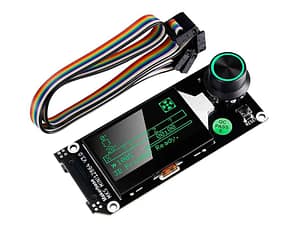
The MKS Motherboard Display is designed to enhance the way you interact with your 3D printer. Built with precision and innovation, this advanced display module provides smooth control, real-time monitoring, and improved usability for both beginners and professionals.
Acting as the command center of your 3D printer, the MKS display ensures seamless communication between the motherboard and the user. Whether you are starting a new print or fine-tuning settings, this display offers accuracy, reliability, and convenience in every operation.
High-Resolution Interface with User-Friendly Navigation
Featuring a sleek and modern design, the MKS Motherboard Display comes with a high-resolution screen that delivers clear visuals and easy menu navigation. The intuitive interface allows users to:
- Access print settings quickly
- View real-time temperature data
- Monitor print progress
- Navigate files effortlessly
- Adjust printer parameters with precision
MKS Motherboards and Displays
Showing all 11 results
- Sold Out
- Sale!


Advanced Features for Enhanced Printing Performance
The MKS Motherboard Display is equipped with powerful features that allow complete customization of your 3D printing experience. Users can:
- Adjust nozzle and bed temperature settings
- Control print speed and motion parameters
- Pause, resume, or stop prints instantly
- Monitor live print status and system feedback
By providing full control at your fingertips, this display module improves efficiency, reduces errors, and enhances overall print quality.
(FAQs) – MKS Motherboard Display
1. What is an MKS Motherboard Display used for?
The MKS Motherboard Display is used to control and monitor a 3D printer. It allows users to adjust temperature settings, manage print speed, navigate files, and monitor real-time printing progress directly from the screen.
2. Is the MKS display compatible with all 3D printers?
The MKS display is compatible with most 3D printers that use MKS (Makerbase) motherboards. However, compatibility depends on the specific motherboard model and firmware installed. It is recommended to verify compatibility before installation.
3. Can I upgrade my existing 3D printer with an MKS display?
Yes, you can upgrade your existing 3D printer with an MKS Motherboard Display if your motherboard supports it. Many users install it to enhance usability, improve interface control, and access advanced features.
4. Does the MKS Motherboard Display support touchscreen functionality?
Some MKS display models come with touchscreen functionality, while others use a rotary knob interface. The features vary depending on the specific model you choose.